Smart speakers have become an essential part of modern homes, and Amazon’s Alexa lineup stands out as one of the most popular and versatile options available today. With multiple models designed for different needs, budgets, and environments, choosing the right Alexa device can feel overwhelming at first. Each version offers unique features that go beyond simple voice commands, turning Alexa into a true digital assistant for daily life.
From managing smart home devices to playing music, setting reminders, checking the weather, or answering questions in real time, Alexa devices are designed to simplify routines and enhance convenience. However, not all Alexa models are created equal. Differences in audio quality, screen presence, size, and smart home compatibility can significantly impact the user experience depending on how and where the device will be used.
Understanding the main Alexa models and their strengths is the key to making a confident choice. In this guide, you’ll find a detailed breakdown of the most popular Alexa devices, their ideal use cases, and practical tips to help you select the model that best fits your lifestyle and expectations.
What Is Alexa and How Does It Work?
Alexa is a voice-controlled virtual assistant developed by Amazon. It uses cloud-based artificial intelligence to understand voice commands, answer questions, control smart devices, and perform thousands of tasks known as “skills.” Once activated by a wake word, Alexa listens, processes the request online, and responds almost instantly.
Alexa-enabled devices connect to the internet via Wi-Fi and can integrate with a wide range of smart home products, including lights, plugs, thermostats, cameras, and TVs. Over time, Alexa learns preferences and routines, becoming more personalized with continued use. This adaptability is one of the reasons Alexa remains a top choice in the smart assistant market.
Echo Dot: Compact, Affordable, and Practical
The Echo Dot is one of the most popular Alexa devices, especially among first-time users. Its compact size makes it easy to place in bedrooms, offices, or small living spaces without drawing too much attention.
Despite its small form factor, the Echo Dot offers solid sound quality for casual listening, voice control, and everyday commands. It’s ideal for users who want access to Alexa’s core features without investing in a larger or more expensive device.
Another advantage of the Echo Dot is its affordability. It provides excellent value for money, making it a great entry point into the Alexa ecosystem or an easy way to add voice control to multiple rooms in a home.
Echo: Balanced Performance for Everyday Use
The standard Echo model is a step up from the Echo Dot in terms of audio quality and overall performance. It features larger speakers, producing richer sound that works well for music, podcasts, and audiobooks.
This model is well-suited for living rooms, kitchens, or shared spaces where sound quality matters more. It maintains a clean, modern design while offering improved microphones for better voice recognition, even in noisy environments.
For users looking for a balance between performance, price, and versatility, the Echo is often considered the safest and most flexible choice.
Echo Studio: Premium Sound Experience
The Echo Studio is designed for users who prioritize audio quality above all else. Equipped with multiple speakers and support for spatial audio technologies, it delivers immersive sound that rivals dedicated home speakers.
This model is ideal for music lovers who want deep bass, clear vocals, and room-filling sound without investing in a complex audio setup. It integrates seamlessly with music streaming services and can adapt audio output based on room acoustics.
While it comes at a higher price point, the Echo Studio is the best option for those who see Alexa not just as an assistant, but also as a central entertainment device.
Echo Show: Alexa with a Screen
The Echo Show series combines Alexa’s voice capabilities with a built-in display, opening up new possibilities for interaction. These devices are especially useful for visual tasks such as video calls, watching recipes, checking calendars, viewing security cameras, or following step-by-step instructions.
Different screen sizes are available, allowing users to choose based on space and usage. Smaller versions fit well on bedside tables or desks, while larger screens work better in kitchens or common areas.
If you value visual feedback and hands-free interaction with on-screen information, the Echo Show can significantly enhance your Alexa experience.
Echo Pop: Minimalist and Stylish
The Echo Pop is designed for users who want a modern, minimalist Alexa device that blends seamlessly into their decor. It focuses on simplicity, offering essential Alexa features in a stylish, space-saving design.
This model works well in small rooms, apartments, or environments where aesthetics are important. While its sound performance is more modest, it handles voice commands, reminders, and smart home controls efficiently.
For casual users or those who already own other Alexa devices, the Echo Pop can be a practical and visually appealing addition.
How to Choose the Ideal Alexa Model for Your Needs
Choosing the right Alexa device depends on how you plan to use it. Start by identifying your primary goal: voice assistance, music playback, smart home control, or visual interaction.
If you mainly want a voice assistant for reminders, questions, and basic commands, compact models like the Echo Dot or Echo Pop are more than sufficient. For shared spaces where music and sound quality matter, the standard Echo or Echo Studio will provide a better experience.
Users who enjoy visual content, video calls, or guided instructions should strongly consider an Echo Show. Screen size should be selected based on available space and viewing distance.
Alexa for Smart Home Integration
Alexa is widely recognized for its compatibility with smart home devices. Many Alexa models can act as hubs, simplifying the setup and control of connected products.
Before choosing a model, consider how many smart devices you plan to connect and whether you want advanced automation. Some Alexa devices offer built-in smart hubs, reducing the need for additional hardware.
This makes Alexa an excellent choice for users looking to build or expand a smart home ecosystem gradually.
Privacy and Security Considerations
Privacy is an important factor when choosing any smart assistant. Alexa devices include multiple privacy features, such as microphone mute buttons, activity history controls, and customizable privacy settings.
Understanding these options helps users feel more comfortable using Alexa in daily life. It’s always recommended to review and adjust privacy settings during initial setup.
Choosing the right placement for your Alexa device also contributes to a better balance between convenience and privacy.
Design, Size, and Placement Tips
Alexa devices come in various designs and sizes, making it easier to find one that fits your space. Smaller models are ideal for discreet placement, while larger devices can serve as focal points in a room.
Think about where the device will be most useful. Kitchens, bedrooms, offices, and living rooms all benefit from different Alexa features. Proper placement improves voice recognition and overall usability.
Matching the design to your home decor can also enhance the overall experience and satisfaction with the device.
Is It Worth Having More Than One Alexa Device?
Many users choose to place multiple Alexa devices throughout their home. This allows seamless voice control in different rooms and creates a more integrated smart environment.
Using multiple devices also improves accessibility and convenience, especially in larger homes. Alexa can synchronize music, reminders, and routines across devices for a consistent experience.
Starting with one device and expanding later is often the most practical approach.
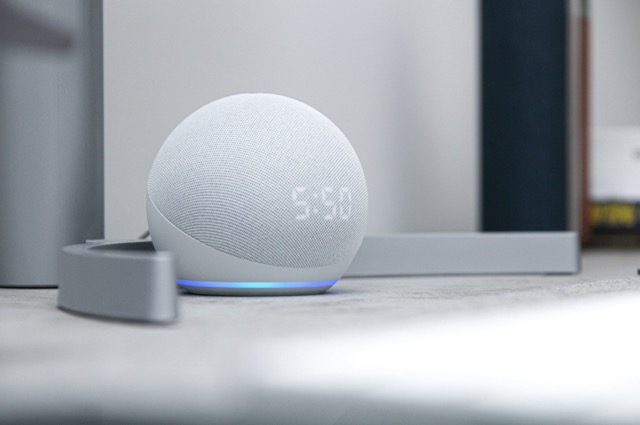
Alexa Audio Quality Differences Explained in Detail
When choosing an Alexa device, sound quality often becomes one of the most decisive factors, especially for users who listen to music daily. Not all Alexa models deliver the same audio experience, and understanding these differences helps avoid disappointment after purchase. Smaller models like the Echo Dot and Echo Pop are designed for voice clarity rather than immersive sound, making them suitable for alarms, reminders, and casual listening. They perform well in quiet environments but may struggle to fill larger rooms with rich audio.
Mid-range models such as the standard Echo offer a noticeable improvement, featuring stronger bass, clearer mids, and better volume balance. This makes them ideal for kitchens and living rooms where music plays during daily activities. At the top of the spectrum, the Echo Studio delivers a premium audio experience with spatial sound, deeper bass response, and automatic room adaptation. This model is closer to a dedicated speaker system than a basic smart assistant, appealing to users who care deeply about sound performance.
Understanding Alexa Screen Sizes and Their Practical Impact
Alexa devices with screens introduce a new layer of functionality, but screen size plays a critical role in usability. Smaller displays work well for bedside use, showing alarms, weather updates, and notifications without overwhelming the space. These compact screens allow quick glances while maintaining the convenience of voice control, especially during morning and nighttime routines.
Larger screens, on the other hand, transform Alexa into a visual hub. In kitchens, bigger displays make following recipes easier, showing step-by-step instructions clearly from a distance. They are also better for video calls, calendar overviews, and security camera feeds. The larger the screen, the more Alexa shifts from a simple assistant to an interactive home display, influencing how frequently users engage with visual features.
How Alexa Fits Different Room Environments
Choosing the ideal Alexa model also depends heavily on room placement. Bedrooms benefit from compact devices with subtle lighting and responsive alarms. Models with displays can double as smart clocks, reducing the need for additional gadgets. In home offices, Alexa devices support productivity by managing schedules, timers, and background music without distraction.
Living rooms demand stronger speakers and better microphone sensitivity, especially in open-plan layouts. Kitchens require devices that can hear commands over running water or appliances, making microphone quality essential. Bathrooms, although less common, benefit from smaller Alexa models placed safely away from moisture, enabling hands-free access to music and reminders during daily routines.
Alexa as a Daily Productivity Assistant
Beyond entertainment, Alexa plays a significant role in productivity. Users can set recurring reminders, create shopping lists, manage calendars, and even dictate quick notes. Voice interaction reduces friction, allowing tasks to be completed faster without interrupting workflow. This is particularly useful for multitasking environments where hands-free operation matters.
Routines further enhance productivity by automating multiple actions with a single command. A morning routine might include weather updates, traffic information, and calendar summaries, while an evening routine can dim lights, play relaxing music, and set alarms. The effectiveness of these routines remains consistent across Alexa models, making even entry-level devices powerful organizational tools.
Smart Home Control and Automation Depth
Alexa’s compatibility with smart home devices extends far beyond basic on and off commands. Users can group devices by room, create automation triggers, and link actions to schedules or sensor inputs. Some Alexa models support built-in smart home hubs, reducing the need for additional equipment and simplifying setup.
Automation depth becomes more valuable as smart homes grow. Lights can adjust automatically based on time of day, thermostats can respond to voice commands, and security devices can provide instant status updates. Choosing an Alexa model that aligns with future smart home expansion ensures long-term satisfaction and scalability.
Voice Recognition and Microphone Performance
Microphone quality directly affects how enjoyable Alexa is to use. Entry-level models perform well in quiet environments but may struggle with background noise. Larger models typically feature multiple microphones arranged to capture voice commands from various angles, improving accuracy.
In busy households, improved microphone sensitivity makes a noticeable difference. Alexa can respond reliably even when music is playing or conversations are happening nearby. This responsiveness reduces frustration and encourages more frequent use, reinforcing Alexa’s role as an always-available assistant rather than a device that requires repeated commands.
Design Choices and Aesthetic Considerations
Design plays a bigger role than many users initially expect. Alexa devices are often placed in visible areas, making appearance important. Compact models blend easily into shelves, desks, or nightstands, while larger devices can act as decorative elements.
Color options, fabric finishes, and minimalist shapes allow Alexa to complement different interior styles. Choosing a design that aligns with personal taste increases the likelihood that the device feels like a natural part of the home rather than a piece of intrusive technology.
Connectivity and Network Stability Factors
Alexa devices rely entirely on a stable internet connection. While all models require Wi-Fi, performance can vary based on placement and network strength. Devices placed far from routers may experience delays or dropped responses, regardless of model quality.
Some users choose to position Alexa devices strategically to improve connectivity, or invest in mesh networks to ensure consistent coverage. Considering network layout during placement helps maximize responsiveness and reduces potential frustrations during daily use.
Using Alexa for Entertainment Beyond Music
Alexa supports a wide range of entertainment options beyond music playback. Users can listen to podcasts, audiobooks, news briefings, and radio stations. Devices with screens allow access to video content, casual games, and interactive experiences.
These entertainment features turn Alexa into a versatile companion during downtime. Whether following a cooking video, listening to a guided meditation, or enjoying a podcast while working, Alexa adapts to different moods and activities seamlessly.
Accessibility and Inclusive Features
Alexa devices offer strong accessibility features, making them suitable for users with different needs. Voice control benefits individuals with mobility limitations, while adjustable speech speed and volume support varied hearing preferences.
Visual feedback on screen-equipped models aids users who benefit from both auditory and visual information. These inclusive features ensure Alexa remains usable and helpful across diverse user profiles and age groups.
Long-Term Value and Software Updates
One often overlooked advantage of Alexa devices is continuous improvement through software updates. Amazon regularly adds new skills, improves voice recognition, and enhances system stability without requiring new hardware purchases.
This long-term support extends the lifespan of Alexa devices, making them a more sustainable investment. Even older models continue to gain new capabilities over time, ensuring that users benefit from evolving features without frequent upgrades.
Expanding Your Alexa Ecosystem Gradually
Many users start with one Alexa device and expand gradually. This approach allows experimentation with placement, features, and routines before committing to multiple units. Alexa’s ability to synchronize across devices makes expansion seamless.
Adding devices over time enhances convenience without overwhelming the user. Each new device integrates into existing routines, strengthening the overall smart home experience while keeping setup manageable.
Conclusion
Alexa devices offer a wide range of options designed to meet different needs, preferences, and budgets. From compact models focused on simplicity to advanced devices delivering premium sound and visual interaction, there is an Alexa model for virtually every type of user. By understanding the main differences between each option and considering how Alexa will fit into your daily routine, you can make a more confident and satisfying choice. Selecting the right Alexa device isn’t just about technology—it’s about creating a smarter, more convenient living environment that works naturally with your lifestyle.
Frequently Asked Questions
1. Can all Alexa models control smart home devices?
Yes, all Alexa-enabled devices can control compatible smart home products, though some models offer built-in hubs for easier integration.
2. Do Alexa devices require a subscription?
No subscription is required to use Alexa. Some third-party services and premium features may require separate subscriptions.
3. Is Alexa always listening?
Alexa listens for a wake word. Audio is processed only after the wake word is detected, and privacy settings can be customized.
4. Can I use Alexa without other smart devices?
Yes, Alexa works perfectly well as a voice assistant even without smart home products.
5. Which Alexa model is best for beginners?
The Echo Dot is generally the best choice for beginners due to its affordability, simplicity, and core functionality.