Drilling into a wall might seem like a simple task, but what lies beneath the surface can turn a small home project into a costly mistake. Water pipes, gas lines, and other concealed systems often run unpredictably behind drywall, plaster, or concrete. Hitting one accidentally can result in leaks, structural damage, safety hazards, and expensive repairs that could have been easily avoided with the right preparation.
In recent years, mobile technology has made home maintenance and DIY projects more accessible. Apps designed to help identify pipes inside walls aim to reduce uncertainty by offering guidance based on smartphone sensors, external scanning devices, or digital mapping tools. While they are not a substitute for professional inspections, these apps can be extremely useful as a first layer of precaution.
This comprehensive guide explores how pipe detection apps work, what they can and cannot detect, their advantages, limitations, and best practices for using them effectively. If you want to approach drilling, renovations, or installations with greater confidence and awareness, this article will help you make informed decisions before touching your walls.
What Are Apps to Identify Pipes Inside Walls?
Apps to identify pipes inside walls are mobile applications designed to assist users in locating hidden plumbing and utility lines before drilling or cutting into wall surfaces. Their primary purpose is to reduce the risk of damaging concealed infrastructure by providing visual or guided indications of where pipes may be located.
These apps do not physically penetrate walls or generate X-ray images. Instead, they rely on indirect detection methods such as magnetic field changes, density variations, temperature differences, or data received from external scanning devices. Some apps also function as organizational tools, allowing users to map known pipe routes over time and document findings during renovations.
They are commonly used by homeowners, renters, DIY enthusiasts, handymen, and even professionals who want a quick preliminary scan before using more advanced equipment.
Walabot DIY
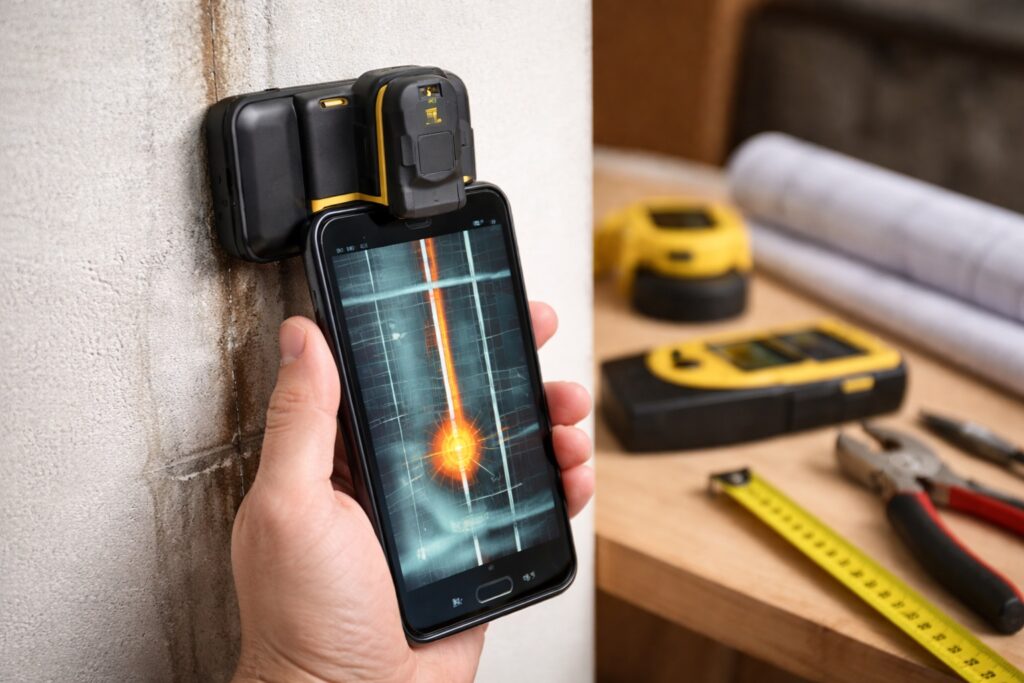
Walabot DIY is one of the most advanced solutions available for identifying objects inside walls, including metal pipes, plastic pipes, studs, and electrical wiring. Unlike apps that rely only on smartphone sensors, Walabot requires a dedicated hardware device that attaches to the phone and works together with the app.
The app provides real-time visual imaging of what is behind the wall, displaying shapes and positions rather than simple alerts. This makes it especially useful for renovation projects, repeated drilling, and professional or semi-professional use.
Walabot DIY performs best on drywall and is less effective on concrete or very thick walls. While it requires an initial investment in hardware, it offers significantly higher accuracy than phone-only apps.
Stud Finder + Wall Scanner Apps
Many modern stud finders come with companion apps simply labeled as Stud Finder or Wall Scanner, depending on the manufacturer. These apps connect via Bluetooth to a physical scanner and display detection results on the phone screen.
The main advantage of these apps is improved clarity. Instead of relying on lights or beeps from the scanner, users see visual indicators showing the possible location of pipes, studs, and wires. Some versions also estimate depth and material type.
These apps are ideal for users who already own a digital stud finder and want better interpretation of scan results. Accuracy depends heavily on the quality of the external scanner rather than the app itself.
Metal Detector by Smart Tools
Metal Detector by Smart Tools is a popular magnetometer-based app that uses the smartphone’s built-in magnetic sensor to detect metal objects behind walls. It measures changes in the magnetic field as the phone moves across a surface.
This app can sometimes identify steel or iron pipes, nails, and metal studs inside drywall. However, it cannot detect plastic pipes and struggles with copper due to its weak magnetic properties.
Metal Detector by Smart Tools works best as a preliminary safety check rather than a definitive detection tool. It is most useful for simple tasks like hanging shelves or picture frames in standard drywall.
Metal Detector by Netigen Tools
Metal Detector by Netigen Tools operates similarly to other magnetometer-based apps but focuses on providing clearer visual feedback and real-time numeric readings. Users move the phone along the wall while monitoring spikes in magnetic intensity.
This app can help indicate the presence of metal pipes or metal-reinforced structures behind walls. Its effectiveness decreases in environments with high electrical interference or thick construction materials.
It is best suited for casual DIY users who want a quick, free way to reduce risk before drilling but understand that results are approximate.
Wall Scanner by Matalab
Wall Scanner by Matalab markets itself as a multifunction detection app, claiming to identify pipes, wires, and studs. In practice, it primarily uses sensor-based interpretation rather than true scanning technology.
While the interface is simple and user-friendly, accuracy is limited. It may detect metal objects in some cases but should not be relied upon for precise pipe location.
This app is more appropriate for educational or exploratory use rather than serious renovation planning.
AR Wall Scanner Apps
Some newer apps branded as AR Wall Scanner use augmented reality concepts to simulate what might be behind a wall. These apps typically rely on user input, typical construction patterns, and sensor data to create a visual overlay.
It is important to understand that these apps do not perform actual detection. Instead, they offer estimations based on assumptions and should be treated as visual guides rather than technical tools.
They can be useful for learning how pipes are commonly routed but should never be used as the sole method for drilling decisions.
Thermal Camera Companion Apps
Apps that work with external thermal cameras, such as FLIR-based companion apps, can sometimes help identify hot water pipes when water is actively flowing. The app displays temperature variations on the wall surface.
These apps are highly situational. They only work when there is a noticeable temperature difference and are affected by insulation, wall thickness, and ambient temperature.
They are best used as supplementary tools, particularly when tracing hot water lines rather than locating cold water or gas pipes.
Pipe Detection Apps for Planning and Documentation
Some apps focus less on detection and more on organization. These apps allow users to upload blueprints, draw pipe paths, and document discoveries made during renovations.
While they do not scan walls, they are extremely useful for long-term home management, especially after pipes have been exposed or professionally mapped.
They are ideal for homeowners who want to avoid future guesswork and maintain accurate records of their property.
How Do Pipe Detection Apps Work?
Understanding how these apps function is essential for setting realistic expectations. Most solutions fall into one or more of the following categories.
Magnetic Field Detection
Many smartphones are equipped with magnetometers, originally intended for compass navigation. Pipe detection apps can use this sensor to identify disturbances in magnetic fields caused by metal pipes hidden behind walls. When the phone passes over a metallic object, the app may display a spike or alert.
This method works best for ferrous metals such as iron or steel. It is less effective for copper and generally ineffective for plastic pipes.
Signal-Based Detection with External Devices
Some apps act as interfaces for stud finders or wall scanners that connect via Bluetooth. These external devices emit signals that detect changes in wall density or material composition. The app then translates this data into visual cues, showing approximate locations of pipes, studs, or wiring.
This hybrid approach significantly improves accuracy and is often preferred by professionals or serious DIY users.
Thermal and Temperature Analysis
A smaller number of apps support thermal analysis, usually in combination with external thermal cameras or sensors. These tools can sometimes detect hot water pipes by identifying temperature differences on wall surfaces while water is flowing.
Thermal detection is situational and depends heavily on wall material, insulation, and water temperature.
Digital Mapping and Documentation
Some apps focus on long-term planning rather than real-time detection. They allow users to upload blueprints, annotate pipe routes, and store notes or photos from previous work. While they don’t actively detect pipes, they are valuable for managing information over time, especially in older buildings.
Types of Pipes These Apps Can Detect
Detection success varies widely depending on the type of pipe and the surrounding environment.
Steel and Iron Pipes
These are the easiest to detect due to their strong magnetic properties. Apps using magnetometer data or external scanners are most effective with these materials.
Copper Pipes
Copper is non-ferrous, making it harder to detect using magnetic sensors alone. Detection is more reliable when using advanced stud finders or density-based scanners.
Plastic and PVC Pipes
Plastic pipes cannot be detected magnetically. Apps may infer their location indirectly through wall density changes, temperature variations, or building plans, but accuracy is limited.
Gas Lines
Gas lines are typically metal and may be detected, but extreme caution is required. Apps should never be relied upon as the sole safety measure when gas is involved.
Key Advantages of Using Pipe Detection Apps
Improved Safety
Accidentally drilling into a pipe can cause flooding, gas leaks, or electrical hazards. These apps provide an additional safety layer that helps users make more cautious decisions.
Cost Prevention
Repairing damaged pipes often involves opening walls, replacing materials, and dealing with secondary damage. Preventing the problem is far cheaper than fixing it.
Ease of Access
Most apps are easy to install and use, making them ideal for quick checks before small projects like mounting shelves, TVs, or cabinets.
Better Project Planning
Apps that support mapping and documentation help users understand their space better, especially during long-term renovations or repeated upgrades.
Limitations and Realistic Expectations
Despite their usefulness, pipe detection apps have important limitations.
Sensor Constraints
Smartphone sensors are not designed specifically for construction diagnostics. Their accuracy is limited compared to professional equipment.
Wall Material Interference
Thick walls, concrete, tiles, insulation, and metal studs can interfere with detection results and cause false readings.
False Positives and Missed Pipes
Apps may indicate pipes where none exist or fail to detect real ones. Results should always be interpreted cautiously.
Not a Professional Replacement
These tools are meant to assist, not replace, certified inspections or professional scans.
Apps That Work Best with External Scanners
Apps paired with stud finders or wall scanners offer the highest reliability. External devices are specifically designed to detect changes in wall structure, making them far more accurate than phone-only solutions.
This setup is ideal for users who frequently perform home projects and want better precision without investing in industrial-grade equipment.
How to Choose the Right Pipe Detection App
Identify Your Needs
For occasional drilling, basic apps may suffice. For renovations or repeated work, consider apps compatible with external scanners.
Check Device Compatibility
Not all phones support the same sensors. Ensure the app works properly with your smartphone model.
Evaluate Interface and Guidance
Apps with clear visuals, calibration steps, and warnings reduce user error and improve reliability.
Review Real User Feedback
Look for reviews mentioning wall type, pipe material, and practical use cases rather than generic ratings.
Best Practices for Using Pipe Detection Apps
Calibrate Every Time
Calibration ensures the app adapts to your environment. Skipping this step reduces accuracy.
Scan Slowly and Repeatedly
Move the phone steadily and scan the area multiple times from different directions.
Cross-Check Results
Use common sense, visual inspection, and building knowledge alongside app readings.
Exercise Extra Caution in Wet Areas
Bathrooms, kitchens, and laundry rooms are more likely to contain pipes and require additional care.
Are Pipe Detection Apps Useful for Renters?
Yes. Renters often face restrictions on wall modifications, and accidental damage can result in financial penalties. These apps help minimize risk before making even small changes.
When Professional Help Is Necessary
For major renovations, load-bearing walls, gas lines, or extensive drilling, professional scanning is always recommended. Apps are best used as preliminary tools, not final decision-makers.
The Future of Pipe Detection Technology
As smartphone hardware improves and augmented reality becomes more widespread, pipe detection apps are expected to evolve significantly. Future tools may provide real-time overlays showing estimated pipe paths directly on camera views, making hidden infrastructure easier to understand.
How Accurate Are Pipe Detection Apps in Real-World Situations?
Accuracy is one of the most common concerns when it comes to pipe detection apps. In real-world use, accuracy depends on a combination of factors rather than the app alone. Wall material, pipe depth, pipe type, and even environmental interference all play a significant role in the results users experience.
Apps that rely exclusively on smartphone sensors tend to be moderately accurate only in controlled conditions, such as drywall with metal pipes located close to the surface. Once walls become thicker, reinforced, or layered with insulation, accuracy drops noticeably. External-device-based apps perform far better because they are designed specifically to detect structural changes rather than interpret indirect signals.
It is important to understand that no consumer-level app guarantees perfect accuracy. The most reliable approach is to treat app results as probability indicators rather than exact confirmations.
Best Apps for Different Wall Types
Not all walls behave the same way when scanned, and choosing the right app depends heavily on wall construction.
Drywall is the most app-friendly surface. Magnetometer-based apps and scanner companion apps tend to perform reasonably well, especially when metal pipes or studs are present.
Plaster walls are more challenging due to density and irregular construction. Apps paired with external scanners provide more consistent results, while phone-only apps may generate false readings.
Concrete and brick walls are the most difficult. Most consumer apps struggle in these conditions, and even advanced scanners have limitations. In these cases, apps should only be used for planning and documentation rather than detection.
Common Mistakes Users Make When Using Pipe Detection Apps
One of the most frequent mistakes is assuming that the app can “see” through walls. This misconception leads users to trust results blindly instead of using them as guidance.
Another common error is skipping calibration. Many apps require users to calibrate sensors before scanning, and ignoring this step significantly reduces accuracy.
Moving the phone too quickly is also a problem. Scanning should be slow and methodical to allow sensors to detect subtle changes.
Finally, many users fail to consider context. Kitchens, bathrooms, and laundry rooms almost always contain pipes, even if the app does not clearly indicate them.
Using Pipe Detection Apps Together with Traditional Methods
Apps are most effective when combined with traditional inspection techniques. Visual clues such as outlet placement, fixture alignment, and previous drill holes can provide valuable context.
Building blueprints, when available, offer another layer of confirmation. Even older plans can help estimate where pipes are likely routed.
Listening for hollow versus solid sounds while tapping the wall can also help identify studs and voids, supporting app-based findings.
By combining multiple methods, users significantly reduce the risk of error.
Pipe Detection Apps for DIY Projects vs Professional Use
DIY users typically benefit most from apps that are simple, affordable, and quick to deploy. For tasks like mounting shelves, TVs, or curtain rods, basic detection apps can offer enough reassurance to proceed safely.
Professionals, on the other hand, require consistency and precision. For them, apps are usually secondary tools used alongside dedicated scanners and professional-grade equipment.
In professional settings, apps are often valued more for visualization, documentation, and client communication than for detection alone.
Safety Considerations When Relying on Pipe Detection Apps
Safety should always take priority over convenience. Even when an app indicates a clear area, drilling should be done cautiously and incrementally.
Shallow pilot holes reduce risk and allow users to reassess if resistance or moisture is detected early.
Gas lines deserve special attention. Apps should never be the sole decision-making tool when gas infrastructure may be present.
Electrical wiring often runs close to pipes, increasing the risk of combined hazards that apps may not distinguish clearly.
Can Pipe Detection Apps Help with Leak Detection?
Pipe detection apps are not designed to locate leaks directly, but they can assist indirectly in certain scenarios.
Thermal companion apps may highlight warm areas caused by leaking hot water pipes, particularly when temperature differences are significant.
Documentation apps can help track known pipe paths, making it easier to narrow down potential leak zones.
However, specialized leak detection tools or professional inspections remain necessary for accurate diagnosis.
Offline vs Online Functionality in Pipe Detection Apps
Some apps operate entirely offline, relying solely on onboard sensors. This makes them convenient for quick use without internet access.
Other apps require online connectivity for calibration updates, data processing, or cloud-based features such as saved maps and shared projects.
Offline functionality is generally sufficient for basic detection, while online features enhance long-term project management and collaboration.
User Experience and Interface Design
Ease of use plays a major role in how effective a pipe detection app feels. Clear visual indicators, color-coded alerts, and guided scanning instructions reduce user error.
Apps that overload the screen with technical data may confuse beginners, while overly simplified interfaces may frustrate experienced users.
The best apps strike a balance, offering basic guidance with optional advanced information for those who need it.
Battery Consumption and Device Performance
Sensor-heavy apps can consume battery quickly, especially during extended scanning sessions.
Users should ensure their phone is sufficiently charged before starting a project and close unnecessary background apps to improve performance.
External-device-based apps may consume less phone battery since most processing occurs in the scanner itself.
Privacy and Data Storage Considerations
Some apps store scan data, wall maps, and project notes locally, while others sync information to the cloud.
Users concerned about privacy should review app permissions carefully, especially those requesting access to camera, location, or storage.
For most users, data collected by pipe detection apps poses minimal privacy risk, but awareness is still important.
How Often Should You Re-Scan the Same Wall?
Walls can change over time, especially after renovations, plumbing updates, or electrical work.
Re-scanning before each drilling project is recommended, even if the wall has been scanned previously.
Documentation apps are particularly helpful for tracking changes and reducing uncertainty in the future.
Cost Considerations: Free vs Paid Apps
Free apps often rely on basic sensor data and may include ads or limited functionality.
Paid apps or apps requiring external hardware offer better reliability, support, and long-term value for frequent users.
The best choice depends on how often the app will be used and the level of risk involved in the project.
Educational Value of Pipe Detection Apps
Beyond practical use, these apps can help users better understand how buildings are constructed.
By visualizing pipe paths and wall structures, users develop intuition that improves decision-making even without the app.
This educational aspect is particularly valuable for first-time homeowners and DIY beginners.
Future Improvements Users Can Expect
As smartphone sensors evolve, pipe detection apps are likely to become more precise and intuitive.
Advances in augmented reality may allow real-time overlays showing estimated pipe routes directly on live camera views.
Machine learning could help apps learn from repeated scans, improving accuracy over time.
Conclusion
Apps to identify pipes inside walls offer a practical and accessible way to reduce risk during home improvement projects. While they have clear limitations, they can significantly enhance safety and planning when used correctly. By understanding how these apps work and combining them with good judgment, users can approach drilling and renovations with greater confidence and awareness.
Frequently Asked Questions
1. Can these apps detect pipes with complete accuracy?
No. They provide guidance based on indirect data and should not be considered definitive.
2. Do phone-only apps work without extra devices?
They can offer basic insights, but accuracy is limited compared to apps paired with scanners.
3. Are plastic pipes detectable with apps?
Plastic pipes are difficult to detect and often rely on indirect indicators.
4. Is it safe to rely on these apps near gas lines?
They can help indicate possible locations, but professional verification is strongly advised.
5. Are these apps suitable for beginners with no DIY experience?
Yes, as long as users understand their limitations and follow safety best practices.